Printer's Apprentice A superior font manager for Windows
Printer's Apprentice is the powerful and easy to use font manager for Windows. Whether you are a graphic artist, a publishing professional or a software enthusiast,
Printer's Apprentice will help you manage, organize and print your font collection.
The the best way to see if Printer's Apprentice is for you is to take it for a test drive. Our Windows font manager is
free to download and evaluate.
Printer's Apprentice is a professional font manager for Windows 10, 8 & 7. It contains no spyware, adware or viruses. And it won't gunk up your system.
If you don't like it, the software is easy to uninstall.
Download Printer's Apprentice
Purchase Printer's Apprentice
We encourage you to download and evaluate Printer's Apprentice free of charge. If you like the software and continue to
use Printer's Apprentice, you must purchase a license.
Why purchase a license? - A license key gives you the following benefits:
- It removes the evaluation notices displayed when the application starts.
- Additional font catalogs and sample sheets are unlocked.
- The key removes watermarks on printed catalogs and sample sheets.
- Technical support is provided by the development team.
- Free lifetime upgrades!
An individual license for Printer's Apprentice costs $24.99. A single user may use this software on three (3) computers. Corporate
users require a license for each workstation. Multi-copy discounts are available.
After purchasing a license, we will email you a license key that will remove evaluation notices and
unlock additional functionality.
Lost your license key? Use this form to request a new one.
Detailed Feature List
Printer's Apprentice features are listed below. If you don't see what you are looking for, please contact us.
We always strive to add features that our users are asking for!
The Font Manager Built For Windows
- Windows 10, Windows 8 & Windows 7 ready!
- Standard Windows user interface with support for Visual Styles and themes.
- Familiar Windows Explorer-style interface for quickly viewing installed fonts
or browsing uninstalled font files on any media.
- Extensive online help system and "How To" help for all dialogs
and screens.
- Professional setup gets you up and running quickly. When needed, the
uninstaller removes the application and all supporting files.
- Printer's Apprentice contains no spyware, no
malware and no viruses.
View and Examine Your Windows Fonts
Printer's Apprentice makes it easy to find the perfect font for your project.
- Use Printer's Apprentice to browse and examine the fonts installed on your Windows system.
- Currently Installed Fonts, Font Files and Font Groups are displayed in lists on the left side of the screen.
-
Single character,
character set,
sample text and
and keyboard
views are integrated into the main interface using tabs across the top.
- A standard Windows menu and toolbar provide access to other functions in Printer's Apprentice.
- Character set display can be displayed using a grid in a 2x2, 3x3, 4x4, 5x5, 6x6,
7x7, 8x8, 9x9 or 10x10 configuration.
- Keyboard display shows you where symbol and dingbat characters are on a standard
PC keyboard.
- Easily examine copyright and other information embedded in font files.
- Compare Fonts tab shows you multiple fonts at once using your own sample text.
- OpenType, TrueType and Type 1 fonts are all supported.
Manage Your Font Files
Use Printer's Apprentice to manage and organize font collections of any size.
- Preview font files from any source without installing them.
- Features a familiar Windows Explorer-style user interface.
- Use the
Install and
Uninstall features
to quickly manage the fonts on your system. No rebooting is needed.
- Uninstall functions removes fonts from Windows, deletes font-related Registry entries and can
optionally move font files to another location for backup.
- Any number of fonts can be installed or uninstalled at once.
- Uninstalled fonts can be previewed, printed and installed from
any media including external drives, CDR, flash drives, floppies, etc.
- Organize font files into user defined, folder-based font groups.
Organize Your Fonts With Groups
Organize your TrueType, Adobe Type 1 and OpenType font files any way you like by
sorting them into folder-based groups.
- Font group list is integrated into the main Printer's Apprentice window for easy browsing.
- Font groups are managed and navigated using the standard Windows Explorer style tree interface.
- Easily install and remove entire font groups with a few mouse clicks.
- Fonts stored in groups can be viewed and printed just like installed fonts.
- All printed catalogs and sample sheets are available for font groups.
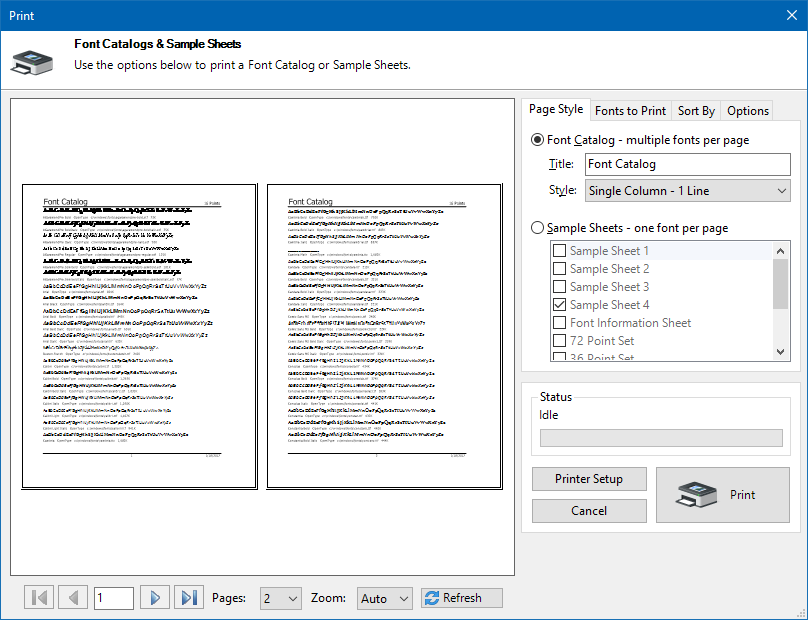
Print Font Catalogs, Books and Sample Sheets
See how great your fonts look on the printed page! Use font catalogs and sample sheets from Printer's Apprentice to
create customer sample or reference books.
See the Font Catalogs and Sample Sheets page for previews of all the printed output.
- Easily print many sample sheets or catalogs for multiple fonts at once.
- Printed output works with both installed fonts and uninstalled fonts on any media. You don't have to install fonts to print them!
-
Multi-page,
zoomable Print Preview window shows you what the output is going to look like.
-
Print
Keyboard and Character Set charts
to help you find those special characters.
-
Features 8 different professionally designed catalogs for printing multiple fonts on a page and 9 single font sample sheets.
- Customizable sample text, headers and footers.
- Font catalogs print multiple fonts per page with customized point sizes.
- Font file name, path location and KB size are optionally printed for each font.
- Multi-page Print Preview
window shows you what the output is going to look like.
Multiple copy discounts are available. Your discount will be calculated
automatically when paying with a credit card. If you wish to
purchase multiple copies using PayPal, please contact us at
helpdesk@loseyourmind.com.
| Quantity | Price |
| 1 |
$24.99 |
| 2 - 5 |
$20.00 |
| 6 - 10 |
$18.00 |
| 11 + |
$15.00 |